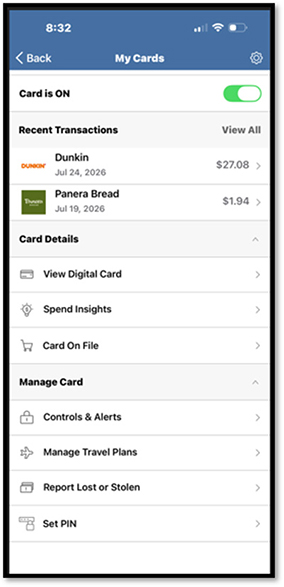
Debit Card Management
All debit cards are preloaded and enabled.
- Members are given an option to view a short video tutorial highlighting all the available features to manage their debit cards.
- Members will be asked to verify their Personal Information that will be used for communicating card activities.
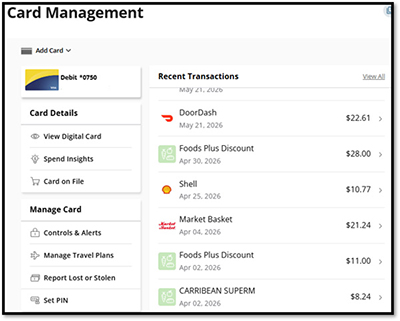
Once Personal Information is confirmed, members can enjoy all the features of the Card Management tool:
- Submit a Travel Notice.
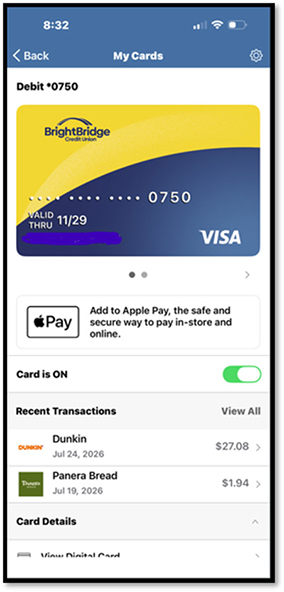
- Turn card on and off:
- For those times when you may have misplaced your card and want to block it until it is found.
- Activate a New Card.
- Establish or Change a PIN.
- Report Lost or Stolen.
- For those times when you’re unlikely to find your card and want it permanently blocked.
- View Digital Card.
- When you need your full card details – This will require members to enter in a security code.
- Enroll a New Card.
- Get access to Spending Insights.
- Understand what, when and where you’re using your card and total dollars spent.
- Set Controls and Alerts.
- Receive notifications and set controls on where, when and how your card is used.
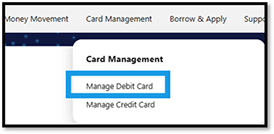
Desktop
Select Manage Debit Card from the Card Management Menu.


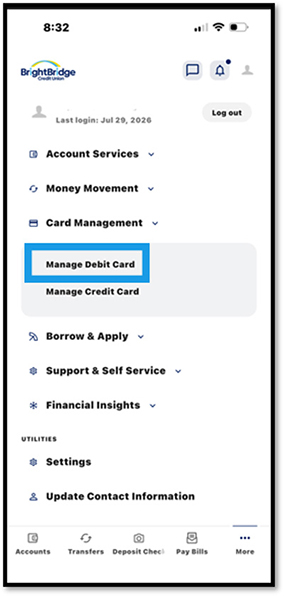
Mobile
Go to the More Menu, select Card Management and then Manage Debit Card.